UBC Communications & Marketing has provided these PowerPoint templates to allow UBC departments to create high-quality materials to help inform the UBC community of upcoming graduation events through the UBC Digital Signage network.
Please read the packaged instructions before using the UBC Spring Graduation Digital Signage Templates. If you have questions about the templates, please contact Jamil Rhajiak (jamil.rhajiak@ubc.ca).
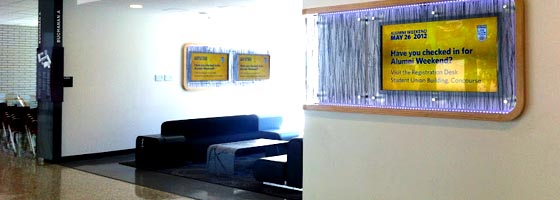
We wanted to see what would be involved in using the many digital signage screens across the UBC Vancouver campus to promote Alumni Weekend 2012. This was done because during normal operation, despite being on the same network, the digital signage screens across campus operate as individual nodes that serve the units that purchased them. We wanted to see if we can leverage the enterprise infrastructure that exists to enhance the experience of Alumni Weekend 2012 participants.
How did we do it?
Identified signs that would be seen by Alumni Weekend participants and worked with the respective signage owners to “take over” their screens for Saturday, May 26th 2012.
Specified what content would add value to the Alumni Weekend experience. This included:
A curated stream of tweets and tweets with pictures from the #UBCAlumniWknd conversation on Twitter
Another source of great content has been student photography. From the start of January 2011 we’ve had pictures from two student photogs – Rabi Sun and Tim Blonk. (Photo Credit: Rabi Sun (Top Left, Top Right, Bottom Middle), Tim Blonk (Top Middle, Bottom Left, Bottom Right))
Here are a few words from Tim on why he’s into photography:
“For me photography is all about freezing the present and defining a moment in space and time. When that satisfying ‘click’ of the shutter is heard, I know that no one else will ever be able to make that exact same picture.
Since I was 8 years old I always wanted to get my hands on my parent’s camera, though they rarely allowed me to even come within a metre of it. Three years ago I bought a point-and-shoot camera, and in February of 2010 I decided it was time to upgrade to a DSLR. It opened a whole new world to me, and within a couple weeks I had watched hundreds of ‘how-to’ YouTube videos all about photography.
Today I am a photography-addict and there is no changing that. There is so much to learn about photography and there are so many things to try out, making it a truly infinite hobby. I hope to start a project soon in which I can sell my own pictures and donate part of the returns to charity. Photography allows me to express my experiences and ideas in the form of 10MB .JPG files.”
Collectively, the Digital Signage team recognizes that the quality, variety, and interestingness of content that appears on displays will be what determines wether they attract attention, or are ignored as background noise. Of course, we want to see each display have a connection with its environment and the people who work, live, and study in those spaces.
As we move forward with the project we want to work with the UBC community to generate and try new types of content. In this series of posts I’ll share the different things that we’re trying out.
Connecting with the revitalized UBC Film Production Program.
Over the past few months I’ve had some really good interactions with UBC Film Production Associate Professor, Chris Gallagher around some ideas for the large outdoor sign at University Boulevard and Wesbrook Mall. Specifically, we thought that it would be really great to involve the students in his FIPR 233 class and some of their project work.
We ended up adapting around 10, 1 minute pieces from an assignment to create a 1 minute short film. Some of the pieces didn’t quite work without audio, but the students were pretty accepting of the limitations that the large outdoor sign poses. I had a chance to visit the class and the students were really happy to learn that their work would be showcased in such a prominent way – what was more exciting was heading out to the sign in the evening after I had visited the class to see a few of the students watching the clips. I distinctly remember one student on the phone with his friends, urging them to come check out his piece…that’s some really encouraging stuff to hear.
The videos played for the entire month of November. They were interspersed between our regular content at the top 15 minutes of each hour. This was done to avoid inundating passers by with non-stop video content as well as to see the “shelf-life” of the content extended.
Overall, I feel that this experiment with using students’ for-credit assignments was a success. Not only did we have more interesting content displayed at a major traffic hub on campus, we also bridged a gap between the operational and academic sides of the University. We also engaged students in a way that really enriches both their experience at UBC (normally these clips would only be marked – not showcased in this manner) and adds to the community at large (yes, i’ve been brushing up on Place & Promise).
Stay tuned…there’s more to come about our partnership with Chris and the Theatre & Film Dept.
After spending the last few months testing, trouble shooting, and running around to make sure content was displaying properly we were finally at a point where we could share the results of our Digital Signage pilot with the Communication Cardinals group (communications professionals from UBC).
The presentation went fairly smoothly, I didn’t trip up on my words as much as I normally do – the nods of approval from the audience really helped. I guess when you’re sharing that you want to help make communicating easier to a bunch of communicators it’s not going to be an uphill climb. Some of the points that I shared were:
Digital signage provides the UBC community with an extremely flexible tool for sharing our messages, this is a great opportunity to get a coordinated approach done right.
High quality content is key – bad digital signage is worse than no signage at all – and we’ll be working to provide support in that area as well.
A connected network augments our ability to reach our community in case of an emergency.
Sharing content will still require connecting across units – the mechanics of sharing content will be automated while maintaining all the benefits of relationship building (say goodbye to Power Point files in your inbox).
We’re really looking forward to using YOUR input to inform our service – so please, join the conversation.
One question from the audience was, “How do you define success?” I kept my answer simple and along the lines of, “High quality content that’s presented through a network of signage and the satisfaction of our user base – that’s you.”
We will be providing four small-group workshops for digital signage managers in December. The workshops will cover the areas of content creation and content scheduling using CoolSign.
Dates:
December 3, 2014 – 10:00AM – 11:00AM | Content Scheduling
December 5, 2014 – 10:00AM – 11:00AM | Content Creation
December 10, 2014 – 10:00AM – 11:00AM | Content Scheduling
December 12, 2014 – 10:00AM – 11:00AM | Content Creation
If you are interested in attending a workshop, please RSVP here.
We will be conducting a planned service upgrade to UBC’s Digital Signage service. The service upgrade will take place on the following dates and times:
Starting: 7:00 AM Friday, May 30, 2014
Ending: 11:30 PM Sunday, June 1, 2014
During the upgrade window, service availability will be affected as follows:
Content management and scheduling via CoolSign Network Manager will not be available.
Display nodes will experience intermittent outages.
Emergency Broadcasting will experience intermittent outages.
Upgrade the existing CoolSign software to the latest stable release.
Enable new features available in CoolSign 5 (scheduling of websites and live streaming)
Migrate existing signage assets to new infrastructure (assets – display nodes, content, channels, playlists, DataWatchers, Datatables and triggers).
Migrate to a multi-tenant, shared services environment.
The service upgrade affects you if one of the following applies:
You manage signage content – you create and manage CoolSign content, channels and/or playlists using the CoolSign software (Network Manager and/or Content Wizard) for your department.
The CoolSign Network Manager (CNM) and Content Wizard applications on your PC (and VPN connection) will no longer be required to manage and schedule content. Upon completion of the service upgrade, access to both the CNM and Content Wizard applications will be via Remote Desktop rather than running the applications from your local PC – please refer to Information for Content Managers for details.
Expired content will not be migrated over to the new infrastructure. Please ensure that all content that you wish to have moved over is active and has an accurate title and expiry date.
Group training sessions will be made available before and after the migration window. If you are unable to attend any of the training sessions, please make alternate arrangements with Jamil Rhajiak (jamil.rhajiak@ubc.ca)
You are an IT technician and are responsible for managing the display node hardware (PC, Display, network port) for your department.
If a display node is offline during the service upgrade, it will not be migrated to the new infrastructure and the node will remain outside of the digital signage network. Please refer to Information for IT Technicians for details.
The migration of display nodes to the new digital signage infrastructure and software should, for the most part, be transparent – i.e. no action needs to be taken on your part.
The following scenarios will prevent the migration of a display node:
The display node PC’s Window OS does not have .NET4 Framework Client profile and Extended installed. A recent remote .NET4 install was conducted across all display nodes – most nodes have been updated successfully, or
During the service migration dates (May 30, 2014 to June 1, 2014 inclusive), a player node is offline (the PC driving the display is not reachable from the Signage server – this could be for many reasons, network issue, network port issue, network cable unplugged, the PC is powered down, etc.)
If a player node is not migrated to the new infrastructure the display will no longer appear in the signage network and content administrators will not be able to assign/schedule assets (content, channels, playlists) to this display.
Units/department with display nodes that do not have the .NET4 pre-req will be contacted on an individual basis prior to the migration window.
Units/departments with display nodes offline during the migration window will be contacted on an individual basis the week following the migration.
As a digital signage content administrator, you should already have the following software installed locally on your computer:
The Cisco AnyConnect client,
The CoolSign Network Manager (CNM) and
The CoolSign Content Wizard
After the service upgrade, you should no longer use any of the CoolSign applications installed on your local computer to access the UBC Digital Signage service – the software is not compatible with the new release of CoolSign running on the back-end servers.
After the service upgrade, the CoolSign Network Manager and Content Wizard applications will be accessible on a central server. You will need the following to connect to the central server:
Remote Desktop Client
For Windows users, to find the “Remote Desktop Connection”, click on the Start button, click All Programs, and then click Accessories.
For Mac users, you will need to download and install a Remote Desktop Protocol (RDP) client of your choice (Microsoft Office 2011 for Mac comes with an application called “Remote Desktop Connection”)
EAD account or local account on the central server
Your EAD account should be the same as your FASmail account
UBC Communications & Marketing has provided these PowerPoint templates to allow UBC departments to create high-quality materials to help inform the UBC community of upcoming graduation events through the UBC Digital Signage network.
Please read the packaged instructions before using the UBC Spring Graduation Digital Signage Templates. If you have questions about the templates, please contact Jamil Rhajiak (jamil.rhajiak@ubc.ca).
Believe it or not, digital signage can be more than just an electronic version of an events board. Understandingly, it’s difficult to find the time to create content that engages your campus community. In my daily browsing of all things digital signage I came across this blog post that nicely packages a few ways to engage your audience.
Enjoy!
-Jamil Rhajiak
Communications Coordinator, Digital Info Channels | Communications & Marketing
The University of British Columbia | Vancouver Campus
We have experienced an unforeseen outage with our servers, the issue has been resolved and we expect display nodes to come online shortly. We apologies for any inconvenience.
UBC IT will be performing maintenance on the CoolSign servers on November 15, 2013 at 6:00PM for approximately 1 hour. CoolSign management functions will not be accessible during this service period. We expect no interruption to the digital signage endpoints.